
What is PaperCut?
A software package that requires each person to authenticate as a current student. PaperCut is currently being used in the following areas:
- Research & Information Commons (RIC)
- Business Lab (B202)
- Business Building Classroom (B204)
- Business Lounge
How is PaperCut used?
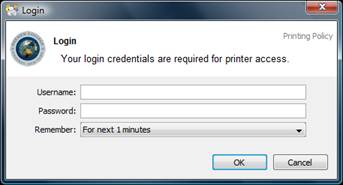
Each time a student chooses to print, they must first authenticate, which verifies they’re allowed to submit documents to be printed. Once authenticated, the student has two options: print or cancel the job. If the job is canceled by the user, he/she will not be charged.
How do I authenticate?
PaperCut requires each user to authenticate by using his/her current Daemen username and password each time a student prints. If you’ve forgotten your password, you may look it up by going to Password Lookup.
How do I know how much each job will cost?
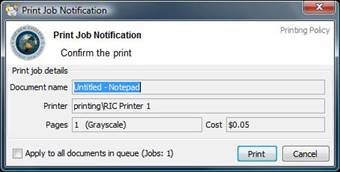
The cost is based on the number of pages required to complete the print job. The current cost is five cents per page for black and white (grayscale) or fifty cents per page for color printing. *Color printing is only available in the Research & Information Commons. The screenshot below shows what the screen will look like right before you submit your job to be printed. Please note the section that shows how many pages are in the document you’re trying to print. Below that, a box shows how much the document will cost to print. Please be mindful of what you print and how much you print. This screen is your last chance to decide whether to proceed with printing and be charged, or to cancel. If you cancel the job at this point, you’ll not be charged.
How do I check my account balance?
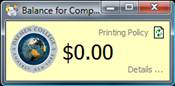
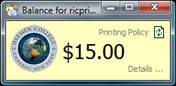
There are a couple of ways to check your account balance. If you’re using a computer in the Research & Information Commons or the Business building (B202, B204), you can log in to the client tool. Each time the computers restart, the screen below will open automatically in the upper right-hand corner of the screen. By default, it will show a zero balance because no one is currently logged in. Once you log in, the balance will update to the current amount in your account. Please see screenshots below:
| Default Screen: | Logged in: |
 |  |
Another way to check your account balance is to visit PaperCut Web portal. Please log in using your Daemen username and password. Here you’ll be able to check your account balance and view recent documents or files that you’ve printed.
Can I request a refund?
If you would like, you may request a refund for a job that was processed under your account. If you do request a refund, we ask that, in the comment field, you explain why you feel the refund is necessary. Once submitted, all requests will be reviewed by Information Technology; please allow 24-48 hours for the processing of requests. To request a refund, go to the PaperCut web portal; log in, then go to “Recent Print Jobs.” Any job that you’ve printed will show up in this section. If you want a specific job refunded, find it and, on the far right, select the option to request a refund. If you choose to request a refund, please explain in the comment field why you feel the job should be refunded.
Can I print two-sided pages?
Yes, by default, all printers in the computer labs print double-sided unless you request single-sided printing before approving the print request.
How much does two-sided printing cost?
Unlike single-sided sheets, which cost five cents per page, two-sided printing costs five cents per full sheet (front and back). When printing two-sided documents, if the document has an even number of pages, the cost is five cents per sheet. If the document is, let’s say, 11 pages long, the first 10 pages are charged to you at five cents per sheet (front and back), and the eleventh page is five cents by itself.